
Why Texas Royalty Brokers?



sellers
Buyers

State Specific Guides
Resources

EnergyLink

If you own oil and gas mineral rights, there’s a good chance you’ve heard of Energylink.
It’s a free online tool that makes it easy for mineral owners to view their check details, track payments, and access important documents from oil and gas operators.
In this post, we’ll walk you through exactly what Energylink is, how to create an account, and how to use it to manage your royalty payments.
What is EnergyLink?
Energylink is a free, online platform that lets mineral owners access their oil and gas check stubs. We sometimes call these royalty statements.
Instead of waiting for paper check stubs to come in the mail, Energylink gives you an easy way to view your check information online. It’s a safe and secure tool that makes accessing details about your royalty income very easy.
Many oil and gas operators use Energylink to send check stubs to mineral owners. In fact, if you’re getting royalty checks from multiple companies, there’s a good chance several of them use Energylink. It allows you to see exactly how your payment was calculated, including production volumes, pricing, and deductions.
In addition to check stubs, operators also use Energylink to send out important tax documents like 1099s at the end of the year. Instead of digging through old mail or waiting for a letter to arrive, you can simply log in to Energylink and download what you need.
It’s a helpful tool that gives mineral owners quick access to important payment information all in one place.
If you aren’t signed up for Energylink, we highly recommend getting signed up. Even if you have no intention of selling mineral rights, having access to your royalty statements is very helpful!
How to Sign Up for EnergyLink
How do you download oil and gas check stubs? Sign up for an Energylink account!
Step 1: Head over to the Energylink Sign Up page.
Step 2: Select United States
Step 3: Under Document Type, select “Revenue”. You would only select “JIB” is if you are a working interest owner. This is rare.
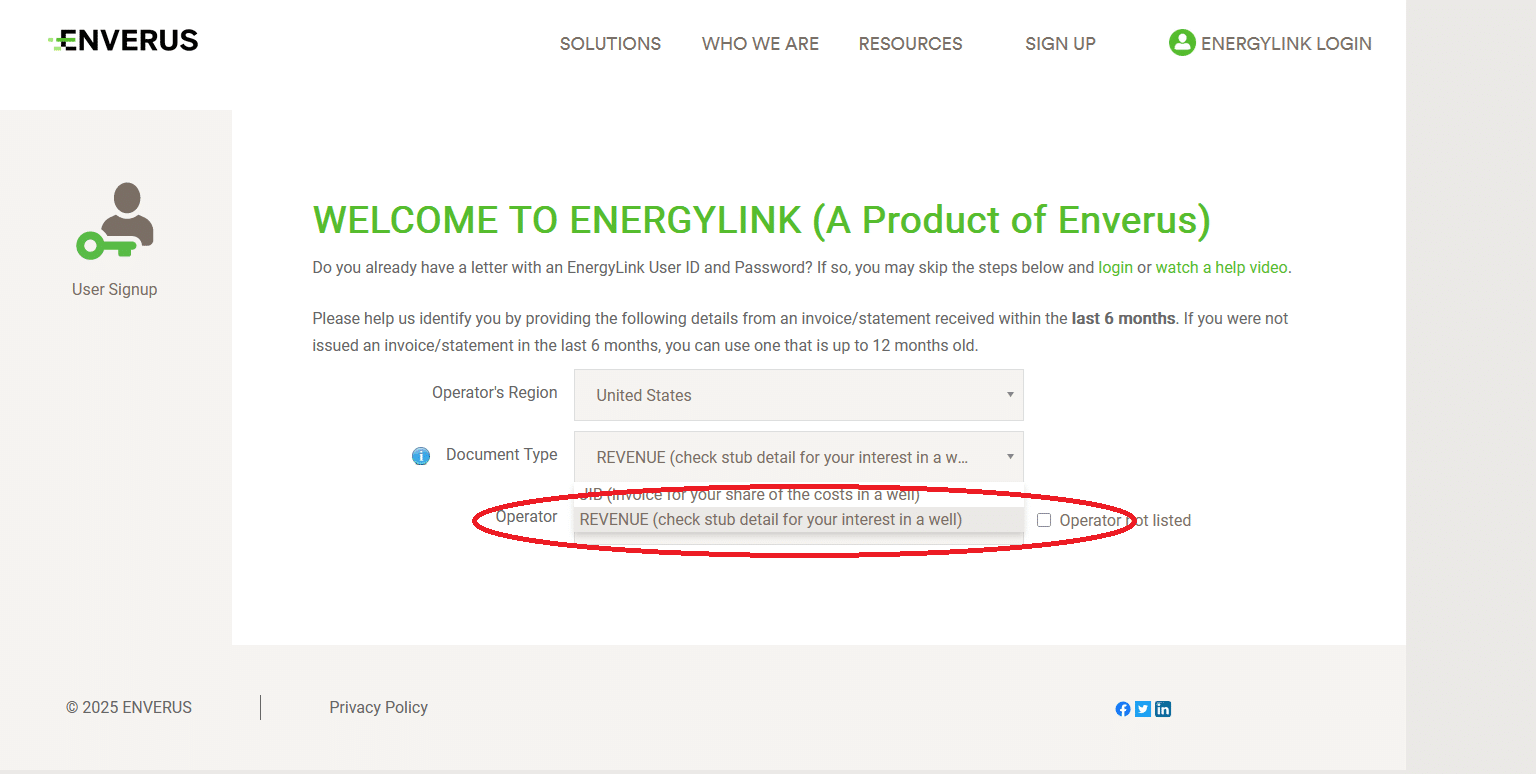
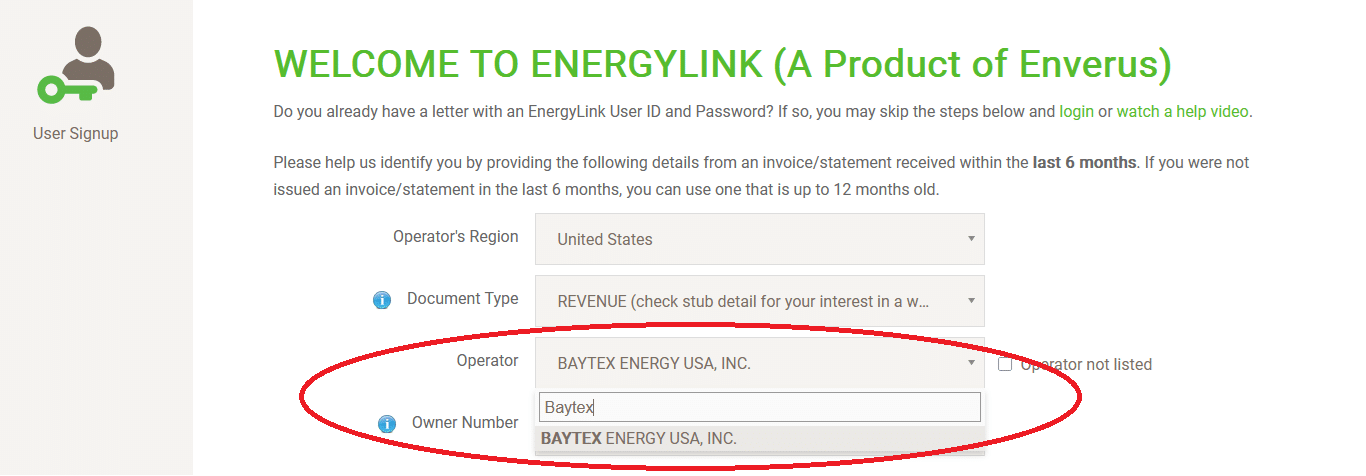
Step 4: Search for the operator who pays you royalties. Make sure to select the exact operator. Some operators have multiple names for each region.
Note: If your operator is not listed, reach out to your operator and ask them directly what system they use to provide check stubs. Some operators use different vendors for this service.
Step 5: Enter the required details for the selected operator.
Owner Number: You must have your owner number to sign up for Energylink. You might find your owner number on the remittance advice from the last check, on an old paper check stub, on an old division order you signed, or other documentation from the operator.
If you don’t have your owner number, search google for your operator name and “Owner Relations” and then email them and request your owner number. For example “Baytex Owner Relations” would bring you to their owner relations page. You would then see their email is: usa.owner@baytexenergy.com Each operator has their own owner relations email address, this is just an example for Baytex.
Check or Direct Deposit Month: The system requires you to enter the amount you received on a recent check to verify you are the owner. This drop down is asking you to select the month you’re using to verify the amount. For example, if you receive a deposit for $100.50 in January, you would select the January month in the drop down.
Check or Deposit Amount: In this box, enter the exact amount you received from the month you selected above. It needs to be correct to the penny.
Email Address: Enter and confirm your email address. Note that you will use this email as your login name for Energylink.
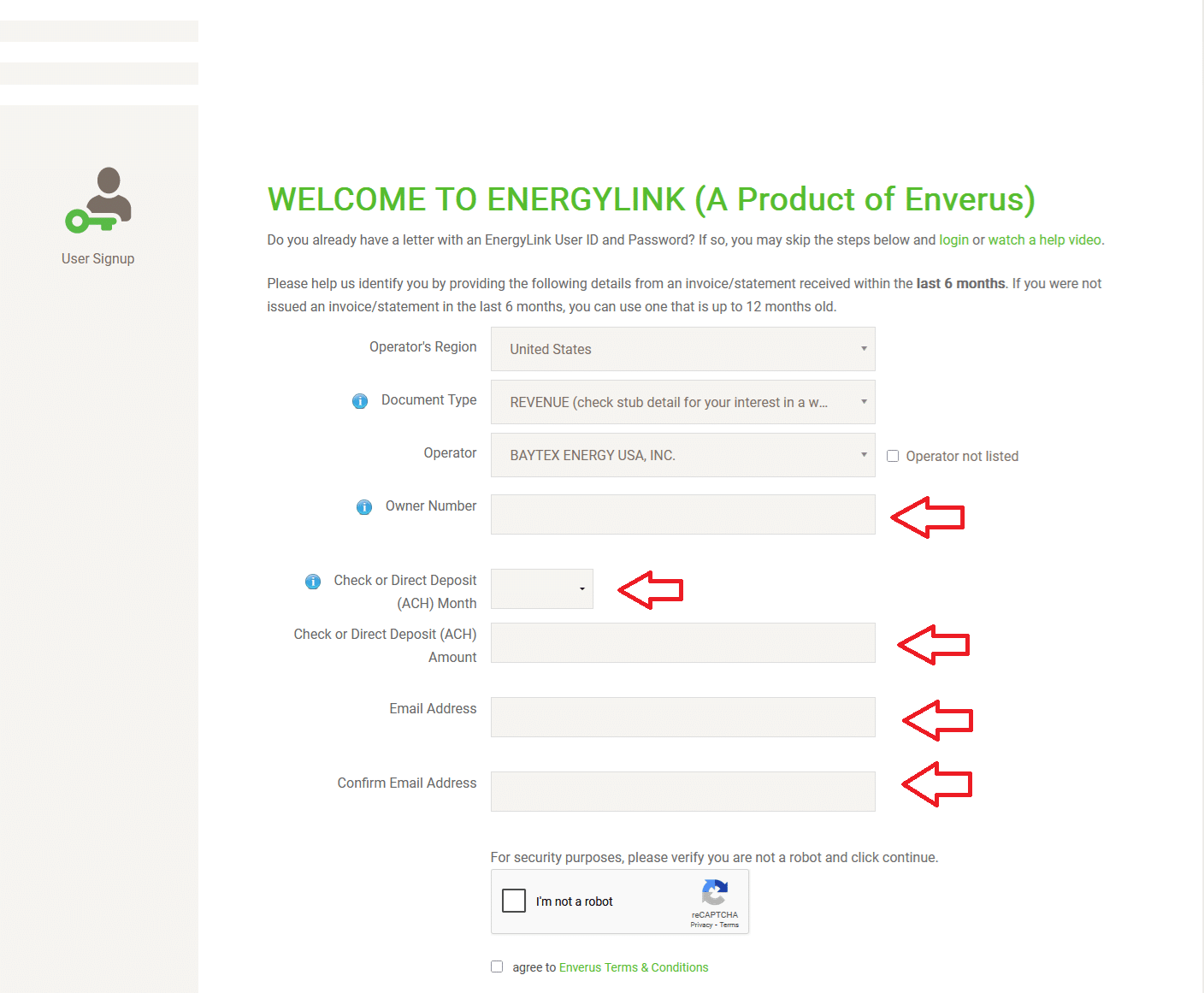
Once you have entered all the information, select continue.
If the system moves forward, you will be prompted to create a password for Energylink.
If the system gives you an error, it will typically be caused by a few things:
Wrong Owner Number: Did you enter your owner number exactly with no spaces before or after? Contact the operator to confirm your owner number if you are not sure.
Wrong Deposit Date / Amount: Try using the month prior to the deposit date. Due to timing issues, you may have deposited or received the funds in one month but the system may see that check date as the prior month. If that doesn’t work, try using a different month and amount.
Wrong Operator: Double check to ensure you have selected the correct operator.
If the system still won’t let you sign up, there are two options:
Contact Operator: Contact your operator and ask them to verify your owner number. This should be step 1. If you are certain that your owner number is correct, reach out to Energylink.
Contact Energylink: Contact them here
Tell them the operator, owner number, check date, and check amount you are entering and ask them to verify what is wrong in their system.
How to Use Energy Link
Once you are able to log in to Energylink, you can now access your check stubs. You will want to download the PDFs to your local device. To do this, there are two ways you can get there.
The system will bring you to one of two locations depending on when you signed up.
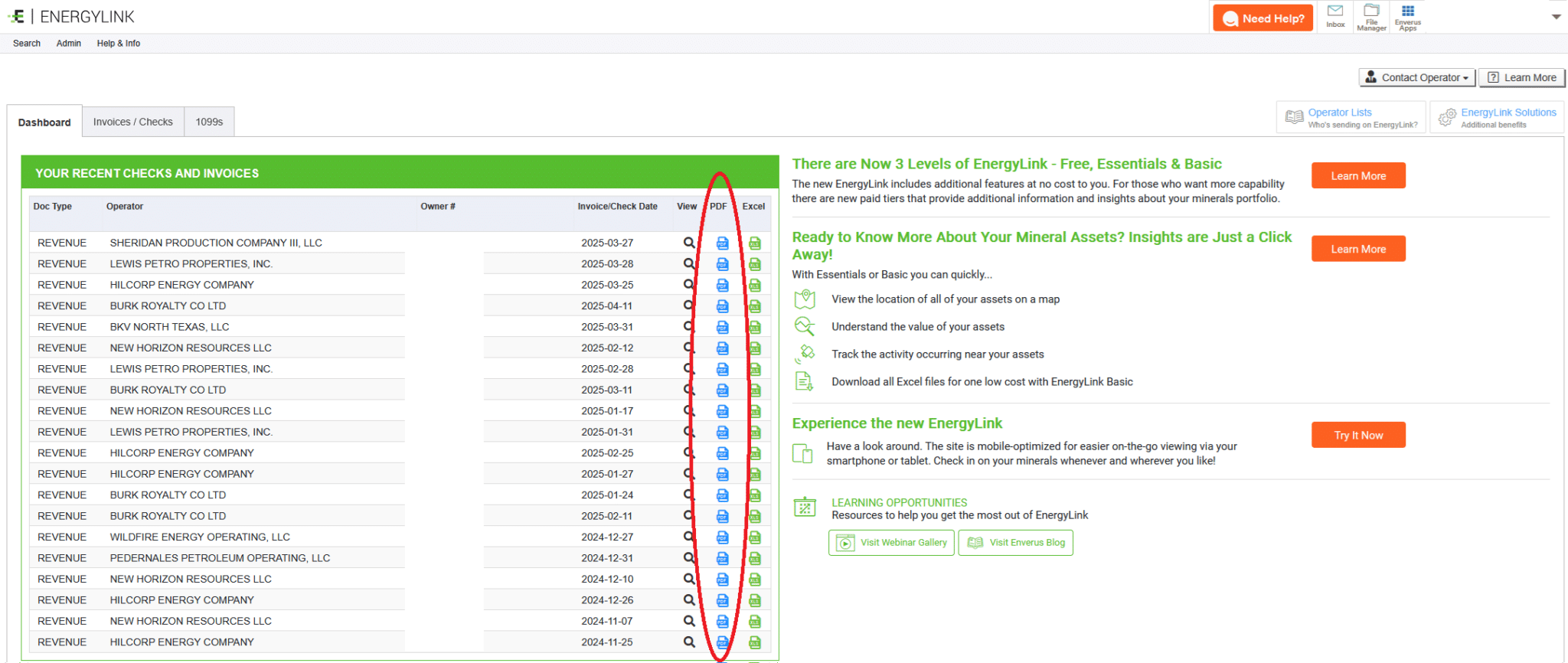
Option 1: If you log in and see the dashboard below, you are on Energylink “classic” and you can easily see your royalty statements. Simply click on each PDF icon next to the month you are trying to download. If you have multiple operators that use Energylink, all of them will be displayed on this dashboard.
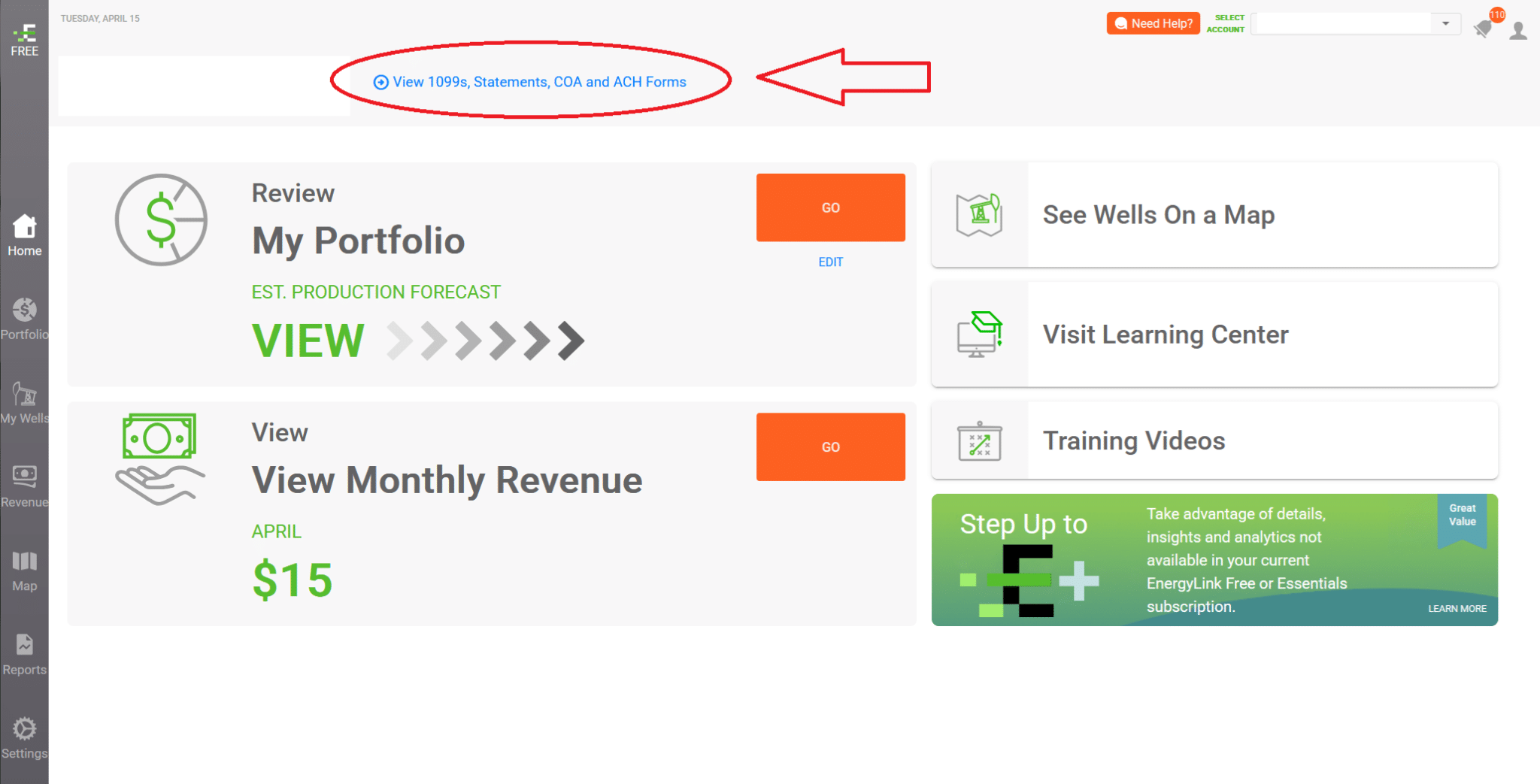
Option 2: If you login and see the “MineraliQ” version, click on the link at the top left in the image below to get back to the Energylink dashboard.
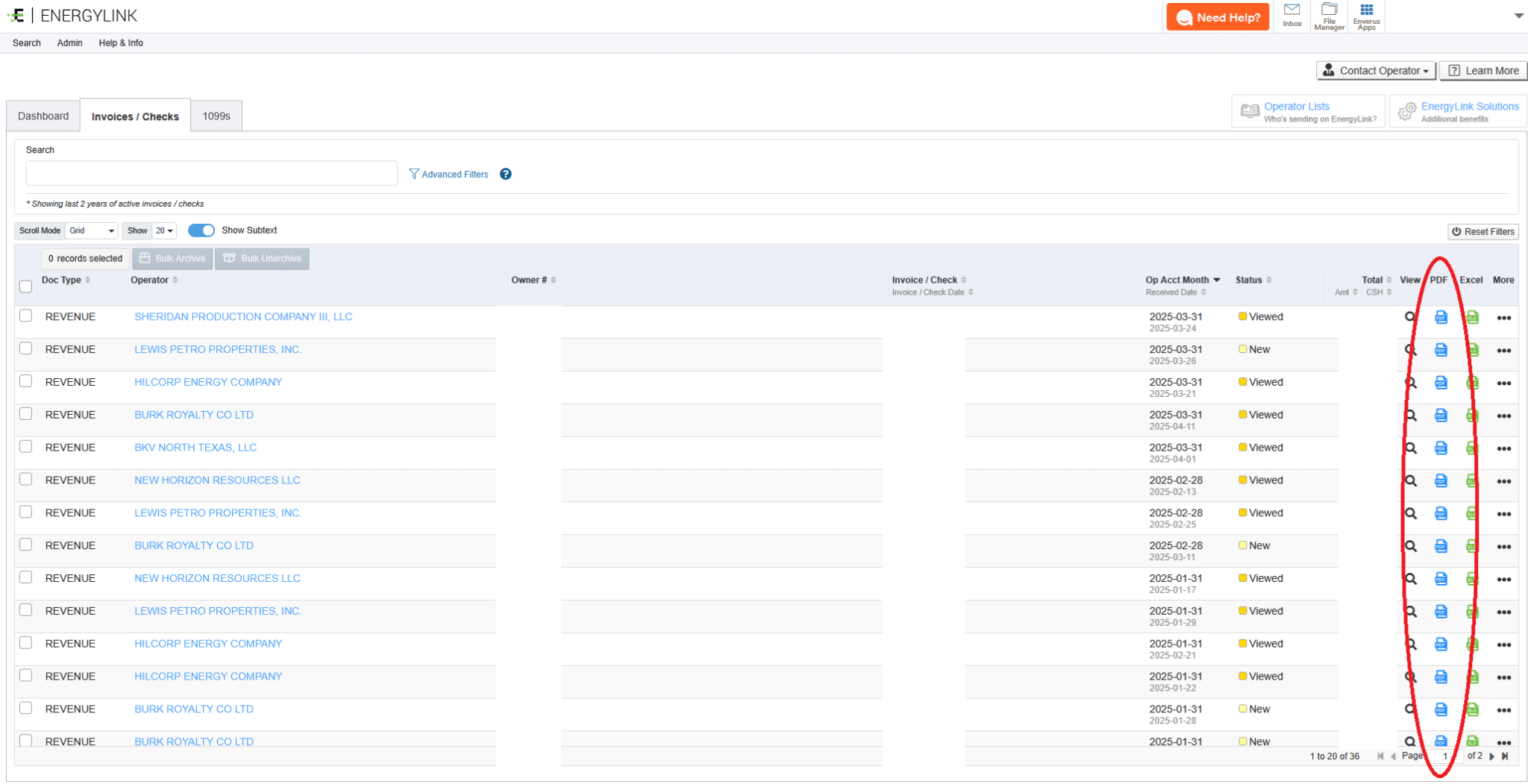
Now you will be at the Energylink dashboard that shows each invoice or check with more detail. You can also click the “Dashboard” link at the top left to see the same view as the other login. Either way, you can download the check stubs by clicking the PDF icon next to the check you want to download.
You are now an Energylink expert!
Additional Resources for Mineral Owners
Below are links to some of our most popular articles. If you own mineral rights, take a few minutes to get more familiar with the industry. Knowing more about your mineral rights can help you make more informed decisions.
How to Sell Mineral Rights
Never Sell Mineral Rights?
Mineral Rights Value
Mineral Rights Taxes
Mineral Owner Mistakes
Oil and Gas Royalties
If you have questions about your mineral rights, use the form below to contact us. Our team is standing by and ready to assist.